

c
eSIM Setup on iPhones
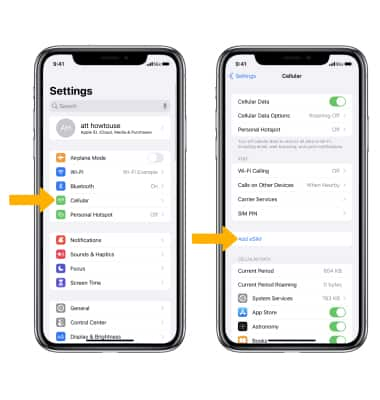
1. From the home screen, select the  Settings app.
2. Select Cellular, then select Add eSIM.
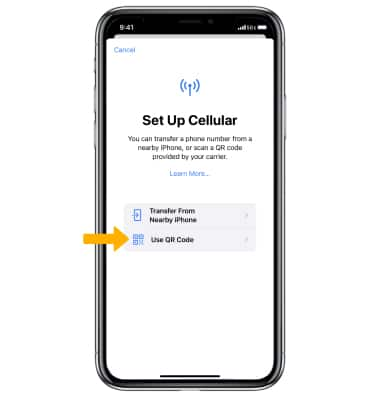
3. Select Use QR Code.
4. Use your iPhone's camera to scan the QR code.

5. Select Continue.

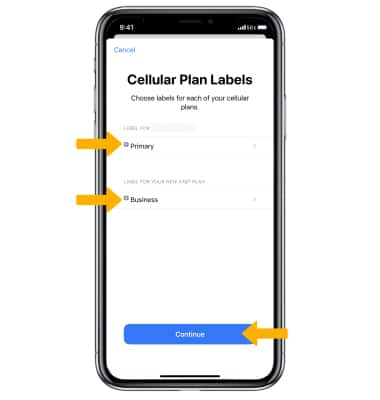
5. Label the Cellular Plans as desired, then select Continue. If you have a physical SIM card installed alongside the eSIM, make sure to turn off Data Roaming for the physical SIM card (data roaming must remain on for the eSIM). Additionally, disable the Allow Cellular Data Switching option in the settings.
eSIM Setup on Android Devices
1. From the home screen, swipe down from the Notification bar, then select the  Settings icon.
Settings icon.2. Select Connections, then select SIM manager.
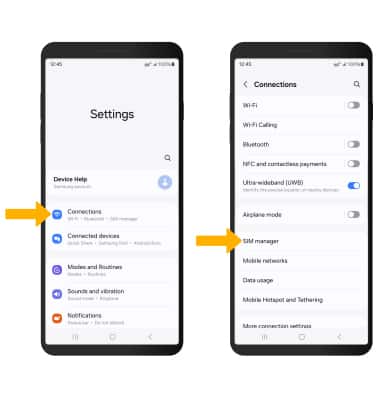
3. Select Add eSIM, then select Scan QR Code and follow the prompts.

Customer Reviews
Overall rating: 4.9 / 5 from 469 reviews.
Good
Had troubles with activating, but the service and response was timely, and the issue was resolved quickly.
Thailand Travel eSIM: 7-30 Day Unlimited Data with Various Plans
SIM card worked with no issues. Previously we had another brand of SIM that failed to work after recent Telstra outage. SIM card was in a security camera, IOT SIM solved connection issue.
IoT SIM Card Australia | 4G M2M Telstra + Optus | No Monthly Fee, Multi-Year
Excellent
IoT SIM Card Australia | 4G M2M Telstra + Optus | No Monthly Fee, Multi-Year
Works great on my 🏍️
Caravan & Trailer Tracker SIM Card Australia 4G GPS Anti-Theft No Monthly Fee
Bought two one worked perfectly. The other one was not compatible with the phone - maybe it needed unlocking.
T-Mobile USA + Canada/Mexico Travel SIM Card: 7-120 Day Unlimited Data with Various Plans
I am using the SIM as a backup link in my home alarm system. It worked straight away i am very happy.
IoT SIM Card Australia | 4G M2M Telstra + Optus | No Monthly Fee, Multi-Year

ESIM it just works! Fast too!
Japan Travel eSIM: 7-30 Day Unlimited Data with Various Prepaid Plans
Perfect for what I needed it for would use again
Bali eSIM - 7-30 Day Unlimited Data Plans | Best eSIM for Bali Travel
Simple to set up and worked better than expected. I was even able to send & receive texts to / from Australian numbers while overseas which was really helpful! I will definitely use Lemon again if I'm overseas.
Canada USA Travel eSIM: 7-30 Day Unlimited Data with Various Plans
Had some difficulty in gaining initial connection, received good support. Works well
IoT SIM Card Australia | 4G M2M Telstra + Optus | No Monthly Fee, Multi-Year
As simple as putting it in the slot and turning the device on. $2 ALDI sim seems to work for inital set up if a number or SMS are needed
Good product. Works with no issues
Bali Indonesia Travel SIM Card: 7-180 Day Unlimited Data with Various Plans
Great experience. Will use them for all my overseas travels
Philippines Travel eSIM: 7-30 Day Unlimited Data with Various Plans
the E-Sim worked well with no issues and easy to setup
Great service, reasonable price. Very happy!!
IoT SIM Card Australia | 4G M2M Telstra + Optus | No Monthly Fee, Multi-Year
Perfect for my GPS and telemetry unit used to protect my motorcycle. Works great. Just put the SIM in, and it worked right off the bat... Thank you.
IoT SIM Card Australia | 4G M2M Telstra + Optus | No Monthly Fee, Multi-Year
Simple and effective
Bali eSIM - 7-30 Day Unlimited Data Plans | Best eSIM for Bali Travel
Easy to set up Had no issues with service Worked everywhere we were in Bali
Bali eSIM - 7-30 Day Unlimited Data Plans | Best eSIM for Bali Travel
Arrived quickly & works as described. Got the 8 year plan, hope I get a reminder near renewing time.
Didn't run out of data. Easy to install.
Japan Travel eSIM: 7-30 Day Unlimited Data with Various Prepaid Plans
Was awesome. Had no problems
Bali eSIM - 7-30 Day Unlimited Data Plans | Best eSIM for Bali Travel
I had a hick up for the first two days but after that it was a god send it has gotten me out of trouble in so many ways
Taiwan Travel eSIM: 7-30 Day Unlimited Data with Various Plans
Good company
Very pleased with my purchase, but for the uninitiated it was somewhat confusing. Website sites could do with expanding explanations somewhat
Works well for what we need
Australia Prepaid IoT M2M SIM Cards with Up to 5 Years of Multiple Data Plans
China sim worked fine , faultless from start to finish.

In Sweden went to Fårö the SIM is great Thank you
Europe Travel SIM Card for 35 Countries: 7-120 Day Unlimited Data with Various Plans
No fuss easy purchase. Quick delivery.
Generally very good
Long-Stay Europe Travel SIM Card for 35 Countries: 45-180 Days Unlimited Data with Various Plans
Seamless experience
I’ve used before and never had a problem, so on my recent trip got again and worked perfectly again. Great price easy to set up is easy.
Bali Indonesia Travel SIM Card: 7-180 Day Unlimited Data with Various Plans

I got a physical SIM card for Borneo Malaysia and to Bali Indonesia. Absolutely perfect. I will continue to use Lemon Mobile. Thank you for your brilliant coverage.
Easy to put into my phone and no problems while I was away. Easy to transfer back again.
Good product
Bali Indonesia Travel SIM Card: 7-180 Day Unlimited Data with Various Plans
Works as described.
Easy to use as always
Japan Travel eSIM: 7-30 Day Unlimited Data with Various Prepaid Plans
Fantastic product. Easy to use and delivered super quick. Customer Service was amazing. I was having a small issue with my initial activation. But following an email to Lemon Mobile I was sorted within minutes. It was exactly what I needed for contacting other while I traveled.
New Zealand Australia 2-in-1 Travel SIM Card: 7-180 Day Unlimited Data with Various Plans
Fantastic product. So easy to use and delivery was quicker than stated. And I have to give a huge shout out to the great customer service, as my teen daughter was using this card while in France on student exchange and initially became unsure how to activate it properly, but a quick email to customer service and a reply within the hour had her up and running... She just had to turn her phone off then on again 😆.
France Travel SIM Card: 7-120 Day Unlimited Data with Various Plans